Wednesday, 30 April 2008

Week 10

This week the group got more used to the LDR and how to use its readings. The group worked on more of the coding side of the project, to make the noise produced be better controlled by the user. This is a screenshot of the Max/MSP setup we used:


When the user was in sufficient range of the LDR, and the reading (light level) fell below a certain value, the sound would be turned on. In addition to that the more the LDR reading fell the lower pitch of the sound produced, and there was also a trigger to light up an LED (as a test light source, where different colour lights will be fixed into the boxes).

There were, however some setbacks. It became clear when we tried to take a second reading from another LDR that there could only be one square wave produced at one time. To correct this problem we will develop the code around the use of MIDI or recorded samples of the square wave.

The Theremin

Because of the nature of Karate Jukebox, it would be a good idea to research into other electronic musical instruments. One of the earliest instruments and also perhaps the most similar to the Karate Jukebox is the Theremin.


Image from: http://www.vintagesynth.com/misc/theremin.jpg

The Theremin is...
"... one of the earliest electronic musical instruments, and the first musical instrument played without being touched..." - Wikipedia article (http://en.wikipedia.org/wiki/Theremin)
... and is still practiced and played by musicians today.


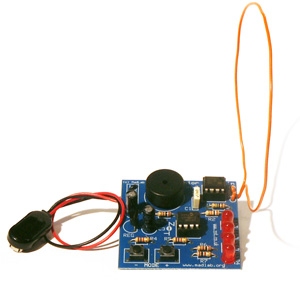
Image from: http://www.madlab.org/kits/photos/theremin.jpg

http://www.madlab.org/kits/theremin.html

This website features information about how to construct a Theremin (the 'junior' example they show looks very similar to the Arduino). The technology they show in this example seems very easy to assemble, and makes the Karate Jukebox seem a bit long-winded. However, Karate Jukebox is meant to be more of a 'fun' experience rather then a learning one. Either way, the outlook for Karate Jukebox's success possibility still remains good.

Thursday, 24 April 2008

Artistic Musical Interfaces

Artistic musical interfaces aren't often thought of in the musical interface 'world'. However, it does have a great example that was put on exhibition at the South Bank in summer 2006.


Image from Philharmonia Orchestra (http://www.philharmonia.co.uk/)


http://www.philharmonia.co.uk/thesoundexchange/play__fllstp__orchestra/

http://www.pixelsumo.com/post/play-orchestra


PLAY.orchestra was a fun, 'virtual' orchestra that consisted of cubes that visitors sat on to start playing one of the pre-recorded instruments that were playing a piece. The layout was to scale of a real full-sized orchestra stage, with the 'instruments' in the places they would be in a real orchestra.

PLAY.orchestra relates heavily to Karate Jukebox because of how it allows users to play individual pieces of sound and involve many users at once. Karate Jukebox will have the added bonus that the user will be generating the sound in real time and not be using pre-recorded instruments playing the same song. This strengthens the opinion that Karate Jukebox will be a huge hit an exhibition.

Gestural Interfaces

The 'Karate Jukebox' project will have users hopping about and using the extremes of their reach and flexibility. These are 'gestures' that are not often found in interfaces in either the artistic or public realms.


However one of the few public application of this, that has seen great success, is with the Nintendo Wii.


Image from Nintendo (http://www.nintendo.com/wii/what)
http://www.nintendo.com/wii/what

The Wii uses a series of positioning sensors to detect a range of movements from its controllers, such as: Tilt, shaking, swinging and so on...

As what is probably obvious, the range of software that could be developed on this platform is huge, and already the Wii has the standard shooting and fighting games, but also unusual golf, bowling and boxing games, as well as a piece of 'fitness' software. All these 'games' adapt the controller and its addons to make the user get more involved in the game in a way they never had before. Some of the different addons for the 'Wiimote' can be found on the Wiki article: http://en.wikipedia.org/wiki/Wii_Remote

The Wii and its interface for users relates to 'Karate Jukebox' because of how the Wii needs users to perform uncommon gestures for users and for this kind of gaming console. Karate Jukebox will be asking the users to do the same because it is not common for musical instruments to be played using the player's furthest stretches or generally moving anything more then their hands.


A more artistic and educational piece of work is a system called PHASE.


Images from ICHIM (http://www.ichim.org)

http://www.ichim.org/ichim05/jahia/Jahia/pid/649.html

http://www.pixelsumo.com/post/phase

The PHASE system generates sounds from how the user interacts with the virtual environment.

The system would change sounds depending on how the user was interacting with the haptic arm, so if a user used brisk and violent moves the sounds generated would also sound violent. A video of PHASE running can be found here.

PHASE is closely related to Karate Jukebox, in that it generates sound based on the user's interaction, and uses an unusual method of 'instrumenting' the sound using the haptic arm.


From the success of the public application of the Wii, there is a good chance to still believe that Karate Jukebox will be a good success at an exhibition because of how unusual the 'instrument' is.

Wednesday, 23 April 2008

Week 9

This week our group continued to experiment with different resistors to find an appropriate type to be used in the project.

This week the group tested an LDR (Light Dependant Resistor) on the same circuit to see if it could give the results we needed for our project. The LDR gave more manageable results, however it did not have a big range of detection in room light, but did perform slightly better when in a box.

The biggest problems still remain of writing the code that will be able to give the desired 'instrumental' effect (whether MIDI or Square Wave) and a sensor that will give reliable usable readings.

Tuesday, 22 April 2008

Musical Interfaces

In contrast to the previous post, back in the 'public' interface 'sector', unusual interfaces are becoming a more and more popular method used by video game developers to enhance the player's experience.

Arguably the most well known and most popular kind of innovative interface is now to use game controller replacements of musical instruments. These instruments are often simplified versions and rough copies of the real instruments, to make the experience more game-like and still keep the new 'challenge' offered by a different physical interface.

A good new interaction device is the Guitar Controller, used with games like the Guitar Hero series.


Image from Coding Horror's Blog (http://www.codinghorror.com/blog/)

The controller is shaped like a real electric guitar, but features only a few buttons (instead of strings) and ways to interact.

Developers are taking this one step further and bringing other instruments alongside the Guitar controller, like the drum and mic controller added to the game Rock Band.


Image from Wired Magazine (http://www.wired.com/)

As before, the controllers are simplified versions of the real instruments, and the game only requires simple input that focuses on fun rather than creating music.

Based on the success of these new interaction devices, an idea like the Karate Jukebox that has been chosen to be developed in my group, would be quite successful and fun at an exhibition.

Interface Art

As mentioned in previous posts, developers like to push the boundaries of interfaces and create (not always useful) innovative and fun ways of changing a user's interactive experience.

An excellent source for these sorts of developments can be found on PixelSumo (http://www.pixelsumo.com).

"Pixelsumo is a blog about play, exploring the boundaries of interaction design, video games, toys and playgrounds." - PixelSumo's About page

PixelSumo attend conventions and write articles on the 'strange' interfaces they find, and provide documentation about them. (corrected, thanks for the comment chriso!)

One of the most interesting and relevant posts made on this website can be found in the "Physical Computing" section of the blog. In here they get to grips with using an Arduino (http://www.pixelsumo.com/post/arduino) at an Arduino workshop. It is interesting to find out that Arduino technology is popular amongst the people 'in-the-know' in the industry and they also feel it is a great platform to create artistic interfaces on.

Some of the other works that have some sort of relevance to the project I am developing are:

Beatbox by Andy Huntington (http://www.pixelsumo.com/post/beatbox-andy-huntington)
Beatbox is a simple device that has a number of different boxes that record their own beat or rhythm. A user taps one of the boxes in a rhythm, and then presses play on that box. The box then loops the rhythm just entered in the form of jumps. Each box can be given a different rhythm, and placed on different surfaces to produce different sounds. A video of it in action can be found on Andy Huntington's website.

I feel this is relevant to what I will be developing for a project because it shows how physical interfaces can react to (not necessarily kinetically) and change according to user interaction.

Opto-isolator by Golan Levin (http://www.pixelsumo.com/post/golan-levin-bitforms)
Opto-isolator is a piece of work that reacts to a user's eye movements. It was designed around the question “What if artworks could know how we were looking at them? And, given this knowledge, how might they respond to us?”. The work has a single eye that follows the user's eyes and even blinks and looks away when you stare at it too long. For pictures and a video of it working go to the Flong website.

I feel this can be related to my chosen project because it is another example of how it is important how interfaces react to the user's interactions.

Absolut Quartet by Dan Paluska and Jeff Lieberman (http://www.pixelsumo.com/post/absolut-machines)

Absolut Quartet is a kind of 'robotic' set of percussion instruments that explores different ways of creating the percussive sounds.

"...the main component is a marimba played by an array of rubber balls shot by robotic cannons. Imagine the visual effect of balls flying almost six feet in the air before hitting the marimba keys with perfect precision. When a chord is played, several balls will be launched simultaneously. As they pass the top of their trajectory, their brief pause highlights the imminent notes.

The second timbre is based on “the finger on the wine glass trick”. The series of glasses, turned to various pitches, are all spinning at the same time - and they are played by small “robotic fingers”. The “Wino” will be able to play almost 40 notes at a time. The final sound source will be an array of robotic percussive instruments.

The mechanical movement of the machine will be obvious, but the cutting-edge technology, or the brain of the machine, is hidden. The degree of artificial intelligence will make the machine be perceived as highly creative, responding differently depending on the input it receives from its users".

See Absolut Quartet in action on Youtube here.

This piece of work is relevant to my project development because it shows how musical instrument interaction and playing can continue to be developed, even in the original unsynthesized versions.

Volume by United Visual Artists and one point six (http://www.pixelsumo.com/post/volume-uva)

Volume is a development that uses numerous posts to sense users and changes according to their proximity. The LEDs on posts and the sounds emitted would also change according to how the users moved through the work.

Pictures and a video of Volume can be seen on the United Visual Artists website.

Volume is another example of how actual interfaces can change depending on their input (rather then just giving an output), an idea that would be good to bring over into my project.

After researching into these works I feel I know what is needed to make a 'good' interface. This is to keep in mind that an interface needs to give appropriate amounts of output according to input, and to not focus on just one of these aspects.

Wednesday, 2 April 2008

Keyboard 2.0?

As mentioned in previous entries, developers like to push the boundaries of existing technology, along with developing their new technologies.


http://www.saitek.com/uk/prod/cykey.htm

The Saitek Cyborg keyboard is a keyboard designed for PC Gamers, which has extra functions like locking the Windows key and lighting up the different sections of the keyboard in different colours. The keyboard also features the now "standard" volume/media player controls and web navigation tools and also user programmable keys.

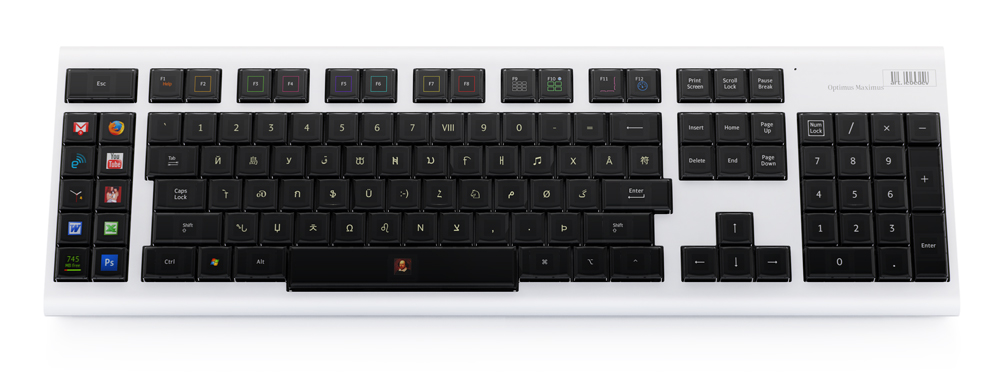
http://www.artlebedev.com/everything/optimus/demo/

Another step taken to create a sort of "Keyboard 2.0" that could see great success in the future is the recently released Optimus Maximus keyboard. This keyboard has tiny OLED screens on each key describing what that key does. The screens change depending on what program the user has open, and what the user does to change the functions of the keys.

Week 8

This week, in our group we continued the experimentation of different sensors to see which would be best suited to be used in the group project. For this session we focused more on manipulating the values read by the sensor and giving a desired output.

We tested what we thought was an Infra-Red sensor, to give a value that Max/MSP would use to parse to a sound output. First we tried the square-wave generator to produce a sound, that would only sound if the value read by the if statement was true, else it would not play anything. We then swapped the square wave generator for Max/MSP's MIDI synthesizer and produced a MIDI sound using the same conditions.

Here is a screenshot of the Max/MSP setup...


We discovered that using analogue sensors will make the code in Max/MSP hard to set up to give a 'sensible' sound as we found the sensor kept sensing and not sensing different values so much the system would be unreliable to use. However, it could be considered that the 'unreliability' or more 'unpredictability' offered by the sensor's readings could enhance the user experience. The group has yet to decide on this.

Week 7

This week we started concentrating on working in groups and confirmed our groups for a group project.

In our groups we collaborated our current concepts that the group could adopt for the project, we weren't satisfied with the ideas the members had come up with so we then got to thinking up new ideas.

In the end I came up with a extremely simpler circuit for the Arduino that would essentially be a giant "wall-keyboard".

Here is a sketch and small description of the circuit and what it does...


Compared to my other concepts this circuit, as already mentioned, would be far easier to manufacturer and assemble. The Arduino's coding would also be a lot shorter and simpler.

We then experimented, as a group, with sensors that could fulfill the task we need. In the workshop we tried using a LDR (Light Dependant Resistor) to give a suitable reading to the analogue port, which would be read in Max/MSP. The LDR produced readings that could possibly be used to signal Max/MSP to play a sound, however it would be good to experiment with other kinds of sensors first, before deciding what kind to put in a prototype.