Wednesday, 30 April 2008

Week 10

This week the group got more used to the LDR and how to use its readings. The group worked on more of the coding side of the project, to make the noise produced be better controlled by the user. This is a screenshot of the Max/MSP setup we used:


When the user was in sufficient range of the LDR, and the reading (light level) fell below a certain value, the sound would be turned on. In addition to that the more the LDR reading fell the lower pitch of the sound produced, and there was also a trigger to light up an LED (as a test light source, where different colour lights will be fixed into the boxes).

There were, however some setbacks. It became clear when we tried to take a second reading from another LDR that there could only be one square wave produced at one time. To correct this problem we will develop the code around the use of MIDI or recorded samples of the square wave.

The Theremin

Because of the nature of Karate Jukebox, it would be a good idea to research into other electronic musical instruments. One of the earliest instruments and also perhaps the most similar to the Karate Jukebox is the Theremin.


Image from: http://www.vintagesynth.com/misc/theremin.jpg

The Theremin is...
"... one of the earliest electronic musical instruments, and the first musical instrument played without being touched..." - Wikipedia article (http://en.wikipedia.org/wiki/Theremin)
... and is still practiced and played by musicians today.


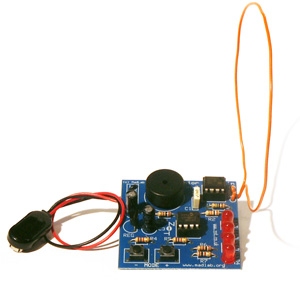
Image from: http://www.madlab.org/kits/photos/theremin.jpg

http://www.madlab.org/kits/theremin.html

This website features information about how to construct a Theremin (the 'junior' example they show looks very similar to the Arduino). The technology they show in this example seems very easy to assemble, and makes the Karate Jukebox seem a bit long-winded. However, Karate Jukebox is meant to be more of a 'fun' experience rather then a learning one. Either way, the outlook for Karate Jukebox's success possibility still remains good.

Thursday, 24 April 2008

Artistic Musical Interfaces

Artistic musical interfaces aren't often thought of in the musical interface 'world'. However, it does have a great example that was put on exhibition at the South Bank in summer 2006.


Image from Philharmonia Orchestra (http://www.philharmonia.co.uk/)


http://www.philharmonia.co.uk/thesoundexchange/play__fllstp__orchestra/

http://www.pixelsumo.com/post/play-orchestra


PLAY.orchestra was a fun, 'virtual' orchestra that consisted of cubes that visitors sat on to start playing one of the pre-recorded instruments that were playing a piece. The layout was to scale of a real full-sized orchestra stage, with the 'instruments' in the places they would be in a real orchestra.

PLAY.orchestra relates heavily to Karate Jukebox because of how it allows users to play individual pieces of sound and involve many users at once. Karate Jukebox will have the added bonus that the user will be generating the sound in real time and not be using pre-recorded instruments playing the same song. This strengthens the opinion that Karate Jukebox will be a huge hit an exhibition.

Gestural Interfaces

The 'Karate Jukebox' project will have users hopping about and using the extremes of their reach and flexibility. These are 'gestures' that are not often found in interfaces in either the artistic or public realms.


However one of the few public application of this, that has seen great success, is with the Nintendo Wii.


Image from Nintendo (http://www.nintendo.com/wii/what)
http://www.nintendo.com/wii/what

The Wii uses a series of positioning sensors to detect a range of movements from its controllers, such as: Tilt, shaking, swinging and so on...

As what is probably obvious, the range of software that could be developed on this platform is huge, and already the Wii has the standard shooting and fighting games, but also unusual golf, bowling and boxing games, as well as a piece of 'fitness' software. All these 'games' adapt the controller and its addons to make the user get more involved in the game in a way they never had before. Some of the different addons for the 'Wiimote' can be found on the Wiki article: http://en.wikipedia.org/wiki/Wii_Remote

The Wii and its interface for users relates to 'Karate Jukebox' because of how the Wii needs users to perform uncommon gestures for users and for this kind of gaming console. Karate Jukebox will be asking the users to do the same because it is not common for musical instruments to be played using the player's furthest stretches or generally moving anything more then their hands.


A more artistic and educational piece of work is a system called PHASE.


Images from ICHIM (http://www.ichim.org)

http://www.ichim.org/ichim05/jahia/Jahia/pid/649.html

http://www.pixelsumo.com/post/phase

The PHASE system generates sounds from how the user interacts with the virtual environment.

The system would change sounds depending on how the user was interacting with the haptic arm, so if a user used brisk and violent moves the sounds generated would also sound violent. A video of PHASE running can be found here.

PHASE is closely related to Karate Jukebox, in that it generates sound based on the user's interaction, and uses an unusual method of 'instrumenting' the sound using the haptic arm.


From the success of the public application of the Wii, there is a good chance to still believe that Karate Jukebox will be a good success at an exhibition because of how unusual the 'instrument' is.

Wednesday, 23 April 2008

Week 9

This week our group continued to experiment with different resistors to find an appropriate type to be used in the project.

This week the group tested an LDR (Light Dependant Resistor) on the same circuit to see if it could give the results we needed for our project. The LDR gave more manageable results, however it did not have a big range of detection in room light, but did perform slightly better when in a box.

The biggest problems still remain of writing the code that will be able to give the desired 'instrumental' effect (whether MIDI or Square Wave) and a sensor that will give reliable usable readings.

Tuesday, 22 April 2008

Musical Interfaces

In contrast to the previous post, back in the 'public' interface 'sector', unusual interfaces are becoming a more and more popular method used by video game developers to enhance the player's experience.

Arguably the most well known and most popular kind of innovative interface is now to use game controller replacements of musical instruments. These instruments are often simplified versions and rough copies of the real instruments, to make the experience more game-like and still keep the new 'challenge' offered by a different physical interface.

A good new interaction device is the Guitar Controller, used with games like the Guitar Hero series.


Image from Coding Horror's Blog (http://www.codinghorror.com/blog/)

The controller is shaped like a real electric guitar, but features only a few buttons (instead of strings) and ways to interact.

Developers are taking this one step further and bringing other instruments alongside the Guitar controller, like the drum and mic controller added to the game Rock Band.


Image from Wired Magazine (http://www.wired.com/)

As before, the controllers are simplified versions of the real instruments, and the game only requires simple input that focuses on fun rather than creating music.

Based on the success of these new interaction devices, an idea like the Karate Jukebox that has been chosen to be developed in my group, would be quite successful and fun at an exhibition.

Interface Art

As mentioned in previous posts, developers like to push the boundaries of interfaces and create (not always useful) innovative and fun ways of changing a user's interactive experience.

An excellent source for these sorts of developments can be found on PixelSumo (http://www.pixelsumo.com).

"Pixelsumo is a blog about play, exploring the boundaries of interaction design, video games, toys and playgrounds." - PixelSumo's About page

PixelSumo attend conventions and write articles on the 'strange' interfaces they find, and provide documentation about them. (corrected, thanks for the comment chriso!)

One of the most interesting and relevant posts made on this website can be found in the "Physical Computing" section of the blog. In here they get to grips with using an Arduino (http://www.pixelsumo.com/post/arduino) at an Arduino workshop. It is interesting to find out that Arduino technology is popular amongst the people 'in-the-know' in the industry and they also feel it is a great platform to create artistic interfaces on.

Some of the other works that have some sort of relevance to the project I am developing are:

Beatbox by Andy Huntington (http://www.pixelsumo.com/post/beatbox-andy-huntington)
Beatbox is a simple device that has a number of different boxes that record their own beat or rhythm. A user taps one of the boxes in a rhythm, and then presses play on that box. The box then loops the rhythm just entered in the form of jumps. Each box can be given a different rhythm, and placed on different surfaces to produce different sounds. A video of it in action can be found on Andy Huntington's website.

I feel this is relevant to what I will be developing for a project because it shows how physical interfaces can react to (not necessarily kinetically) and change according to user interaction.

Opto-isolator by Golan Levin (http://www.pixelsumo.com/post/golan-levin-bitforms)
Opto-isolator is a piece of work that reacts to a user's eye movements. It was designed around the question “What if artworks could know how we were looking at them? And, given this knowledge, how might they respond to us?”. The work has a single eye that follows the user's eyes and even blinks and looks away when you stare at it too long. For pictures and a video of it working go to the Flong website.

I feel this can be related to my chosen project because it is another example of how it is important how interfaces react to the user's interactions.

Absolut Quartet by Dan Paluska and Jeff Lieberman (http://www.pixelsumo.com/post/absolut-machines)

Absolut Quartet is a kind of 'robotic' set of percussion instruments that explores different ways of creating the percussive sounds.

"...the main component is a marimba played by an array of rubber balls shot by robotic cannons. Imagine the visual effect of balls flying almost six feet in the air before hitting the marimba keys with perfect precision. When a chord is played, several balls will be launched simultaneously. As they pass the top of their trajectory, their brief pause highlights the imminent notes.

The second timbre is based on “the finger on the wine glass trick”. The series of glasses, turned to various pitches, are all spinning at the same time - and they are played by small “robotic fingers”. The “Wino” will be able to play almost 40 notes at a time. The final sound source will be an array of robotic percussive instruments.

The mechanical movement of the machine will be obvious, but the cutting-edge technology, or the brain of the machine, is hidden. The degree of artificial intelligence will make the machine be perceived as highly creative, responding differently depending on the input it receives from its users".

See Absolut Quartet in action on Youtube here.

This piece of work is relevant to my project development because it shows how musical instrument interaction and playing can continue to be developed, even in the original unsynthesized versions.

Volume by United Visual Artists and one point six (http://www.pixelsumo.com/post/volume-uva)

Volume is a development that uses numerous posts to sense users and changes according to their proximity. The LEDs on posts and the sounds emitted would also change according to how the users moved through the work.

Pictures and a video of Volume can be seen on the United Visual Artists website.

Volume is another example of how actual interfaces can change depending on their input (rather then just giving an output), an idea that would be good to bring over into my project.

After researching into these works I feel I know what is needed to make a 'good' interface. This is to keep in mind that an interface needs to give appropriate amounts of output according to input, and to not focus on just one of these aspects.

Wednesday, 2 April 2008

Keyboard 2.0?

As mentioned in previous entries, developers like to push the boundaries of existing technology, along with developing their new technologies.


http://www.saitek.com/uk/prod/cykey.htm

The Saitek Cyborg keyboard is a keyboard designed for PC Gamers, which has extra functions like locking the Windows key and lighting up the different sections of the keyboard in different colours. The keyboard also features the now "standard" volume/media player controls and web navigation tools and also user programmable keys.

http://www.artlebedev.com/everything/optimus/demo/

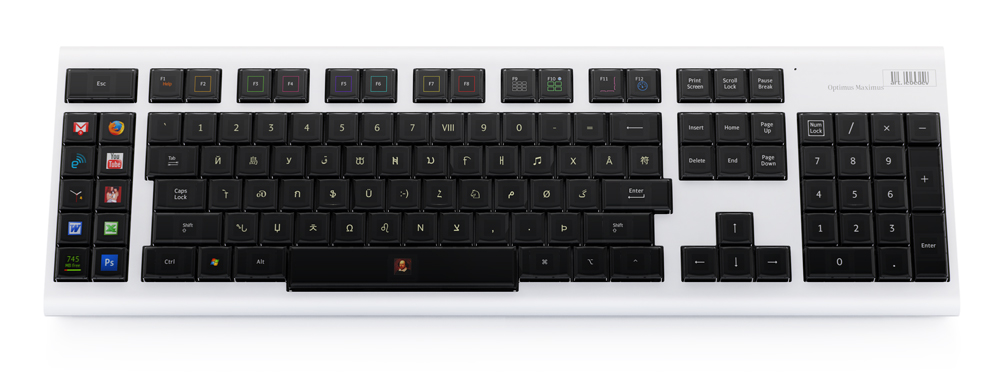
Another step taken to create a sort of "Keyboard 2.0" that could see great success in the future is the recently released Optimus Maximus keyboard. This keyboard has tiny OLED screens on each key describing what that key does. The screens change depending on what program the user has open, and what the user does to change the functions of the keys.

Week 8

This week, in our group we continued the experimentation of different sensors to see which would be best suited to be used in the group project. For this session we focused more on manipulating the values read by the sensor and giving a desired output.

We tested what we thought was an Infra-Red sensor, to give a value that Max/MSP would use to parse to a sound output. First we tried the square-wave generator to produce a sound, that would only sound if the value read by the if statement was true, else it would not play anything. We then swapped the square wave generator for Max/MSP's MIDI synthesizer and produced a MIDI sound using the same conditions.

Here is a screenshot of the Max/MSP setup...


We discovered that using analogue sensors will make the code in Max/MSP hard to set up to give a 'sensible' sound as we found the sensor kept sensing and not sensing different values so much the system would be unreliable to use. However, it could be considered that the 'unreliability' or more 'unpredictability' offered by the sensor's readings could enhance the user experience. The group has yet to decide on this.

Week 7

This week we started concentrating on working in groups and confirmed our groups for a group project.

In our groups we collaborated our current concepts that the group could adopt for the project, we weren't satisfied with the ideas the members had come up with so we then got to thinking up new ideas.

In the end I came up with a extremely simpler circuit for the Arduino that would essentially be a giant "wall-keyboard".

Here is a sketch and small description of the circuit and what it does...


Compared to my other concepts this circuit, as already mentioned, would be far easier to manufacturer and assemble. The Arduino's coding would also be a lot shorter and simpler.

We then experimented, as a group, with sensors that could fulfill the task we need. In the workshop we tried using a LDR (Light Dependant Resistor) to give a suitable reading to the analogue port, which would be read in Max/MSP. The LDR produced readings that could possibly be used to signal Max/MSP to play a sound, however it would be good to experiment with other kinds of sensors first, before deciding what kind to put in a prototype.

Tuesday, 25 March 2008

Conceptions

I sketched some circuits that I have had ideas about creating, as a project using Arduino.

The first is a sort of "Home Remote Control" that would allow users to turn on and off utilities using one control point...


The second idea so far is to make a security system that works "on request"...


Both these ideas are plausible, however, may be a lot of work to implement into a real world scenario.

Sunday, 23 March 2008

Week 6

This week we formed in the same group as the previous weeks and set up a circuit that would control an external circuit through a Reed Relay.

The Reed Relay would only complete the external circuit if there is a current flowing through the Arduino circuit. As a simple test we used the example blinking LED program as the Arduino circuit and then used the Arduino's +5v output to simulate a mains connection, or any constant current.


Here are some pictures of the circuit...


After successfully getting these 'circuits' running, we then replaced the external circuit with a mains connection, and received the same results at the slightly higher voltage.

Here is a video of the updated circuit...


After doing this exercise with Reed Relays I think that using them in to do more actions with mains circuits would be a very interesting and useful path to brainstorm about.

Thursday, 13 March 2008

Week 5

This week we looked at how signals from the analogue output on the Arduino could be used in other applications. I worked in the group I have worked in before because we are feeling like a team now, and know how to share resources and complete tasks effectively.

To begin with, we were provided with a piece of code to upload to the Arduino that could constantly write and read to the serial port...

#include

void setup()
{

// The following command initiates the serial port at 9600 baud. Please note this is VERY SLOW!!!!!!
// I suggest you use higher speeds in your own code. You can go up to 115200 with the USB version, that's 12x faster
Serial.begin(9600); //Baud set at 9600 for compatibility, CHANGE!


}

void loop()
{

if (messageBuild() > 0) { // Checks to see if the message is complete and erases any previous messages
switch (messageGetChar()) { // Gets the first word as a character
case 'r': // Read pins (analog or digital)
readpins(); // Call the readpins function
break; // Break from the switch
case 'w': // Write pin
writepin(); // Call the writepin function
}

}

}

void readpins(){ // Read pins (analog or digital)

switch (messageGetChar()) { // Gets the next word as a character

case 'd': // READ digital pins

messageSendChar('d'); // Echo what is being read
for (char i=2;i<14;i++) i="0;i<6;i++)" pin =" messageGetInt();" state =" messageGetInt();" pin =" messageGetInt();" state =" messageGetInt();">
We then uploaded the code to the Arduino. Initially, the board was not responding to the commands being sent to it. But after some tweaking of the COM ports, it was sending signals. After we got the Arduino successfully broadcasting we connected a potentiometer to it in a simple circuit, as shown below...

We were then introduced to the new application that would be using the serial signal from the Arduino, Max/MSP. Max/MSP is a MIDI/Audio/Video processing program that we will use to produce a square wave according to parameters set by the serial output from the Arduino.

Max/MSP is a visal/object orientated programming environment we will use in real time to produce the square wave. The setup we used from the example (and then adapted to then output to the motherboard speaker) looked like this:

This setup in Max/MSP, coupled with the variable output using the potentiometer from the Arduino through serial, produced a square wave that would change frequency according to the value on a certain pin that the potentiometer was connected to.

Here is a video of the setup running...

After conducting this exercise I think I should start brainstorming ideas for a larger more useful circuits. A good way to start this would be to sketch very basic diagrams of their circuits.

Thursday, 6 March 2008

Week 4

This week, three of us formed as a group again to share resources and practiced developing the Arduino code further, to include arrays and additional loops.

We initially didn't do what we were suggested to do, but instead began by setting up an Arduino that connected to 6 LEDs via separate digital pins. We then adapted a piece of code from the example library to execute two loops (inside an infinite loop) which would light up the LEDs in sequence and then do the sequence in reverse and repeat.

Here is a picture of the circuit...

And a video of the same setup working...


After we had finished this, we experimented with the code from week 2 and added a potentiometer to the circuit to input a value to an analogue pin and change the speed of the flashing LEDs (more along the lines of what was asked of us for the workshop).

Here is the final code:
int potPin = 2;
int pins[] = { 2, 3, 4, 5, 6, 7 };
int num_pins = 6;
int val = 0;

void setup()
{
int i;

for (i = 0; i < i =" 0;" val =" analogRead(potPin);" i =" num_pins">= 0; i--)
{
val = analogRead(potPin);
digitalWrite(pins[i], HIGH);
delay(val+50);
digitalWrite(pins[i], LOW);
Serial.println(val);
}
}
And here is a video of the final circuit working...


After performing this exercise, I feel yet more confident in programming and making circuits using Arduino technology and software. It would be a good idea to start thinking up ideas for a larger scale project that could have use in the public world.

Wednesday, 5 March 2008

Neural Controllers

I have read an extremely exciting article at Techspot (http://www.techspot.com/news/29248-OCZ-to-launch-Neural-Impulse-Actuator-“brain-controller”.html) that talks about how the company OCZ has announced that it is beginning mass production of a "Neural Impulse Actuator (NIA)" and is to launch the product imminently.

Description of device:
The device is essentially a brain controlled peripheral that reads electrical signals from your brain through 3 carbon sensors and turns them into in-game actions – allowing users to control PC games without the use of a keyboard and minimal use of a mouse.

OCZ promises that average users will be able to begin using the device within hours after some initial practice. Of course, use of the device at its full potential will require some significant amounts of training, but OCZ claims the NIA can cut reaction times by as much as 60 percent over a conventional mouse controller. No concrete details on pricing have been confirmed yet, but sources claim the NIA should sell in the $300 range when it becomes available.

This could provide either an enormously immersive form of interaction, or become a tedious or unrewarding experience for users... won't know until it comes out, but it certainly is a step in the right direction and something to at least anticipate.

Tuesday, 4 March 2008

Francis Picabia

While visiting an exhibition at the Tate Modern (Duchamp, Man Ray, Picabia: http://www.tate.org.uk/modern/exhibitions/duchampmanraypicabia/default.shtm) I noticed how some of Picabia's work was influenced by machines.

The piece in particular that I took notice of was "The Camera-Eye" that he made around 1919. (See sketch below)


"Picabia explored the idea of machines replacing humans or taking on human functions, in this case, the camera replacing the human eye." - Exhibit description (next to painting)

I liked the meaning behind this because of how on some levels, this is true. Machines have been used to make a human's job easier, (computers etc.) right up to performing human functions (heart/lung support machines).

The description from the exhibition then goes on to say how Picabia's grandfather, who was an amateur photographer, predicted to Picabia how photography would replace paintings. This, of course, has been the case and painting is not any where near as popular as photography in the public world nowadays.

Monday, 3 March 2008

The Term Maverick Machines

I decided to look into the term "Maverick Machines" and how this name could have been conceived.

A quick search found that there was an exhibition called "Maverick Machines" in Edinburgh (http://maverickmachines.com/WordPress/). On this website it gives the description "machines that are a little unusual" which would fit what maverick means (independent, uncommon), but it does not give a description on what relation this has to interface, so I decided to explore further into what this exhibition was about.

On the website there is a video of the exhibition and the exhibits in action...


From this video it is clear that the machines from the exhibition were VERY unusual, and in fact not very useful in the public world (being as how they feature little interaction or function). However, this exhibition does show how experimentation and innovation gives us interfaces that we take for granted today.

So I decided to look into new interfaces starting to become successful in the public world. One of the biggest innovations (although not new) is touch screen technology. Touchscreen technology allows users to simply use the screen as a method of input. This technology, although it has been around for decades, has only started seeing major implementation in recent years, is now being included for a huge amount of different devices.

Touch screen is seeing particular success in the mobile market, where it works very well along other emerging technologies (such as motion and tilt sensing). These ways of interacting with a device are becoming a sort of "standard" for mobile developers (phone/PDA developers, etc.).

Touch screen is also being used to simplify common things we do in every day life. Microsoft Surface is a real milestone when it comes to the simplest device-free interaction.


As you can see this tabletop computer has been reduced down to the basic components needed for interaction, basically a screen. Another 'cool' feature of this development is how objects are immediately recognised when they are placed down on the table and act independently as a sort of 'Node' that can have files dropped from other devices by 'physically' dragging them.

Now although this development for making things simpler is very cool and interesting, it is also important to give users more in-depth control over their computers as well. Developers cannot forget that some users will want that extra bit of function coupled with the good usability of a device like this.

It is clear from doing this research that levels of interface are sometimes too revolutionary and perhaps come too soon to see real success (if they are actually any good).

Thursday, 28 February 2008

Week 3

This week we got to grips with making and expanding our own Arduino code.

We were given some resources (switches, wire, resistor), and got into groups (resources were low again). We then made an Arduino setup with the switch and resistor so that when the switch is pressed, and the Arduino receives an input signal, an LED turns on.

After we had finished this simple setup (using a piece of code already in the example library), we then added another LED, switch and resistor to the circuit and expanded the code to include them so that when the other switch was pressed, that would turn on the other LED.

Here is the code:

int ledPin = 13; // choose the pin for the LED
int ledPinb = 12;
int inputPin = 2; // choose the input pin (for a pushbutton)
int inputPinb = 3;
int val = 0; // variable for reading the pin status

void setup() {
pinMode(ledPin, OUTPUT); // declare LED as output
pinMode(ledPinb, OUTPUT);
pinMode(inputPin, INPUT); // declare pushbutton as input
pinMode(inputPinb, INPUT);
}

void loop(){
val = digitalRead(inputPin); // read input value
val = digitalRead(inputPinb);
if (val == HIGH) { // check if the input is HIGH
digitalWrite(ledPin, LOW); // turn LED OFF
} else {
digitalWrite(ledPin, HIGH); // turn LED ON
}

if (val == HIGH) { // check if the input is HIGH
digitalWrite(ledPinb, LOW); // turn LED OFF
} else {
digitalWrite(ledPinb, HIGH); // turn LED ON
}
}

Here are some pictures of the first circuit...


Here is a picture of the second circuit...


Here is a video of the second circuit...


After having to modify existing code to adapt to my needs I feel far more confident in making physical interfaces. Now I feel I need to look at current developments in mainstream public interfaces to see how developers are pushing forward the current technology.

Wednesday, 27 February 2008

Arduino Models

Following last week's hand-on introduction to the Arduino I decided to do some research into the kinds of Arduino boards that are available by looking at Arduino's official website. (http://www.arduino.cc/en/Main/Hardware)


Diecimila (http://www.arduino.cc/en/Main/ArduinoBoardDiecimila)


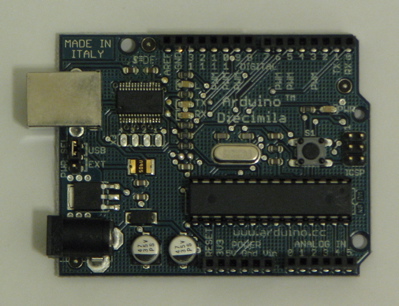
This is the most popular board and is the one I, and others own on my course. It is the most up to date version of Ardunio hardware, uses USB as its computer interface and also has an external adapter.


Mini (http://www.arduino.cc/en/Main/ArduinoBoardMini)


This version offers the same functionality as the full sized board, but with vastly reduced component size, making it able to be put in smaller spaces and let it be less noticeable.


LilyPad (http://www.arduino.cc/en/Main/ArduinoBoardLilyPad)


This version is designed to be able to be stitched into clothing and not be noticeable, and so has the thinnest possible components and no physical protruding pins.


Further variations of the original board include the old Serial edition (uses a 9-pin Serial connector instead of USB) and the Bluetooth edition, where the board communicates with other devices wirelessly.

From all these "flavours" of the Arduino, it is clear that the possible implementations of using Arduino as a medium of developing contemporary interfaces are quite vast and revolutionary.

Wednesday, 20 February 2008

Week 2

This week we were properly introduced to the Arduino technology that was mentioned last week. Over the course of last week and this week we were expected to purchase, and set up our Arduino boards with a simple program that loops a blinking LED on the board.

In this week's workshop we explored what adding extra components to the Arduino can offer as an interface.

We were given some basic components (single core wires, potentiometer) and shown some basic code on how to read serial signals from the Arduino. Because resources were low, some of us worked in a group. We were then told to experiment with how the
potentiometer changes the voltages of its output and told to think how this could be used. After completing the initial experiment, we started to think how the code could be influenced by the changing values of the potentiometer.

After some trial and error, and some studying of the example programs, we managed to edit the first simple piece of code we used as a test (a blinking LED), into a simple interactive artifact.

int potPin = 2; // select the input pin for the potentiometer
int ledPin = 13; // select the pin for the LED
int val = 0; // variable to store the value coming from the sensor

void setup() {
pinMode(ledPin, OUTPUT); // declare the ledPin as an OUTPUT
Serial.begin(9600);
}

void loop() {
val = analogRead(potPin); // read the value from the sensor
digitalWrite(ledPin, HIGH); // turn the ledPin on
delay(val+100); // stop the program for some time
digitalWrite(ledPin, LOW); // turn the ledPin off
delay(val+100); // stop the program for some time
Serial.println(val); //print value of the pin
}


This code only has an extra few lines in, but does so much more when the components are wired correctly.

Video of demonstration and explanation...


... and here are some pictures...


After undertaking this exercise, I feel I have a wider knowledge of what hardware, and physical presence interfaces have. I also have a better understanding on how interfaces cover every aspect of life, and not just in computer software or hardware.

It will be interesting to see what has been done using Arduino technology, and if there would be any limit to its implementations.

Thursday, 14 February 2008

Week 1

We were introduced to the module and told what we were to expect and learn as we went along. At this point it seems good to get an overview of the idea of Human Computer Interaction (HCI), and some of its characteristics.

The way humans interface with computers is constantly changing.

Technologies are becoming smaller and more efficient, new standards are getting introduced, and less and less components are needed.

Software and computer output development often shadow the hardware development. Developers are always looking to push interfaces that bit further and either make things simpler for the user, or add more abilities.

A very uncommon development (and certainly not as well-known) is the development in creating new kinds of ways to interact. This development often uses exsisting or older technology to do what we take for granted in new and exciting ways.

It is a shame these new innovative implementations hardly ever see much of the light of day, but this is to be expected because of how the public do not like to venture too much from hardware standards.

However there is good news because hardware is becoming so much cheaper, more developers are able to experiment and invent new ways to interface with computers.